IT201450_PROJECT3_CMP59
Feature 1: First -Person Movement & Shooting
Input: First the user spawns and when they left click the can shoot darts and hit targets that are scattered throughout the map and arena.
Process: This uses the same functionality as the last dart-shooter that was created but instead is repurposed into the main body of the player as its origin for shooting. If the darts hit a target that can be hit, like a wall or target then the dart goes towards the point. We stay using the same Rigid body with gravity and physics to emulate the dart. More importantly we have attached a camera to a body, and it accepts WASD keys to move around the game scene. Players may also press space to jump and press ESCAPE to enable any UI features currently in place, such as reset button or light adjustments etc.
Output: A player is spawned, it can move using WASD, by using left click it can shoot and hit targets that have different features attached to them.
Feature 2: Shape Iterator
Input : The User must first hit the target box with a dart, and it will spawn a shape from the looped prefabs. Process: The user spawns in and can shoot a dart immediately using the left click and they must hit the target box. The target box is carefully tagged as ‘Target’ so it will add a score when hit. When this Happens it will register as hit and it will begin to loop through the given prefabs. The prefabs are complex as they have two different shapes attached to them. They are also given animations so each has their own type unique animation.
Output: Shapes are spawned, one with an animation and two without and then de-spawn after 2 seconds.
Different From Class: For this approach we made the similar complex shapes as in the class sample but we have added animations to each shape to make it different, additionally put the process in a target box to make the game more fun.
Feature 3: Ball Bouncer
Input : User Walks in range of the box, presses the letter key ‘E’ and spawns in the ball.
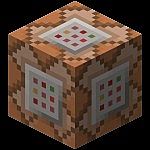
Process: For this process, the user has to be within the proximity of the “Command box” or cube within the game. It will then listen for the key E to be pressed and then the ball with the animation will spawn. The Animation simply moves the ball up and down by changing the Y axis position over the course of 5 seconds.
Output: A bouncing ball that has rigid body and can be shot at using the darts.
Different From Class: Its different in the way the user accesses the ball as they have to physically move the “Player” to the command box to be in range to spawn it.
Feature 4: Ball Bouncer Adjuster
Input : User Walks in range of the right command box and presses either E or L to accelerate the bouncing ball or decrease the speed.
Process: For this process the user must walk up to the command box and just like the last box it listens for K or L to increase or decrease (respectively)the speed at which the ball bounces. We have added incrementing factors so the ball can be increased to infinity but not decreased down to 0. So the ball can be sped up or winded down however the user actually
Output: The ball is speed is decreased or increased incrementally.
Different From Class: We have added incrementation so it can be adjusted freely and not statically, additionally we have made the user input be within the game using the in range function for better feel of the game.
Feature 5: Orbiting Sun/Moon
Input : User Clicks on UI Drop down menu and spawns in either Moon or Sun!
Process: For this the user will need to access the UI , which can be done using the ESCAPE button and then click on the actual drop down menu. Once they reach the drop down menu, they can select either the moon or sun to be spawned. For this we worked around the pivot, like the clock from last project, and made it so it “orbits” around. The orbit stabilizes it make it go a full 360 degrees and this is done through animation feature instead of a pivot like the clock.. Just like a normal rotation would look like from the sky.
Output: An orbiting moon or sun are spawned.
Leave a comment
Log in with itch.io to leave a comment.